
Skip to content

Inspection reporting software

Inspection reporting software for reviewed PDF reports.

Trakora brings inspection observations, evidence, findings and report review into one workflow. Inspectors prepare a structured record, reviewers assess the submitted work and teams export approved PDF inspection reports.

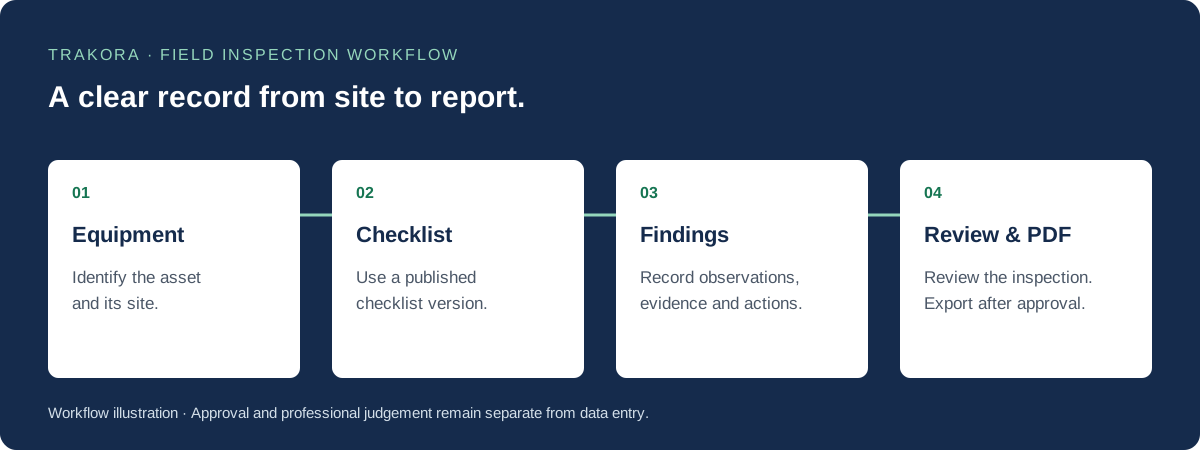
Inspection workflow: select equipment, complete a published checklist, record findings, then review and export an approved PDF report.
From equipment selection to an approved inspection report. Diagram of the Trakora workflow.

Step 01

Write findings that explain the observation

A report is easier to review when a finding says what was observed, where it was found and what action is recommended. Trakora keeps severity, recommended actions and follow-up tasks alongside the inspection record so the reviewer can assess the finding in context.

  • Describe the observed condition clearly.
  • Include location, severity and recommended action.
  • Keep supporting evidence connected to the inspection.

Step 02

Separate drafting, review and approval

A saved draft records progress; a submitted inspection asks for review. Reviewers can assess the work and request changes before approval. This distinction helps teams avoid treating an unfinished record as a final report and keeps the next step clear to the inspector.

  • Prepare the draft before submission.
  • Respond to review feedback and requested changes.
  • Keep approval separate from data entry.

Step 03

Export an approved report and retain its history

Once the inspection has the required approval, the reporting workflow can produce a PDF for download. Approved reports retain their inspection context. When a correction is needed, use the review process for the corrected record rather than silently rewriting an already approved report.

  • Download approved inspection reports as PDFs.
  • Keep reports linked to the equipment and inspection.
  • Retain a reviewable history for subsequent work.

Questions and answers

Inspection software FAQs

Can Trakora generate PDF inspection reports?

Yes. The reporting workflow supports PDF reports for approved inspections. Required completion and review steps must be satisfied before the final report is available.

Can a reviewer request changes before approval?

Yes. The review workflow distinguishes submitted work, review, requested changes and approval so inspectors can respond before the final report is prepared.

Does report generation replace professional judgement?

No. Trakora structures the record and report workflow. Inspectors and reviewers remain responsible for their observations, technical conclusions and any applicable professional requirements.

Explore the workflow

Field inspection, digital checklists and inspection reports

Field inspection software

Manage equipment inspections with published checklists, field observations, evidence, findings and reviewed PDF reports in Trakora. Request a demo.

Digital inspection checklists

Build and publish versioned equipment inspection checklists. Capture answers, required notes and evidence while preserving each inspection's checklist version.