
Capture in the field
Record observations, readings and evidence against the checklist, right where the work happens.
Trakora for inspection teams
Inspect on site. Keep the report moving.
Connect asset inspection records, digital checklists, observations and evidence in one workspace. Turn findings into a clear inspection report your team can review and approve.
“Handrail at the second landing is loose, about two centimetres of play. Emergency light above the door isn’t working.”
Safety · Repair before re-occupancy
Fire & life safety · Above stairwell door
Synthetic example inspection · Not a certification
How it works
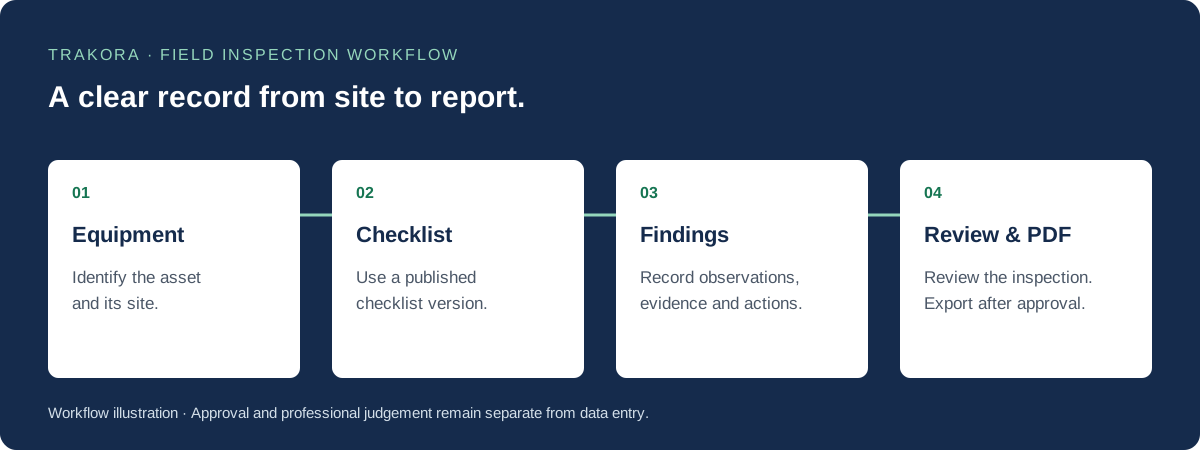
Pick the equipment and published checklist. Record what you see while you inspect.
02Use a versioned digital checklist, then add location, severity and recommended actions to your findings.
03Check the completed inspection, approve the findings and export a report for your client.
Record observations, readings and evidence against the checklist, right where the work happens.
Keep severity, recommended actions and follow-up tasks together in a consistent inspection record.
Review your findings and prepare a clear report your team can approve and export.
Work with your published standards. Optional voice and AI tools depend on your workspace configuration.
Explore the workflow
Manage equipment inspections with published checklists, field observations, evidence, findings and reviewed PDF reports in Trakora. Request a demo.
Build and publish versioned equipment inspection checklists. Capture answers, required notes and evidence while preserving each inspection's checklist version.
Turn field observations into structured findings, review completed inspections and export approved PDF reports with equipment context and inspection history.
Bring recurring equipment checks, asset condition observations and maintenance follow-up into a shared inspection record. Your team defines the checklist and qualified reviewers assess the findings.
Use a responsive browser workspace on site to enter typed answers, notes and evidence. Voice and AI are optional and depend on workspace configuration.
Keep the checklist version, observations, findings and review history connected. A saved draft is not an approval or a certification.
The Trakora resource library
Inspection guides, report templates and review tools for your team. See what’s available and what’s coming next.
Word & PDF template
A blank report structure and a clearly labelled worked example, planned in Word and PDF.
Downloads in preparation
Guide
From field notes to a clear record of scope, observations, evidence and follow-up.
Guide in preparation
Guide
Practical questions for checking a report before it reaches the client.
Guide in preparation
Questions and answers
Trakora is field inspection and reporting software. It connects equipment records, published digital checklists, field observations, evidence, findings, report reviews and approved PDF reports in a company workspace.
Trakora is for individual inspectors and teams that need consistent equipment inspections and a shared report review process. Membership options cover individual, team and enterprise discussions.
Contact Trakora for pricing. Membership is discussed around your inspectors, sites, inspection workflows and reporting needs.
No. Inspectors can use typed answers, notes and findings. Optional voice and AI tools depend on workspace configuration and provider availability.
Trakora connects the people recording equipment conditions with the people reviewing the report.
About Trakora and our approachExplore Individual, Team and Enterprise membership for your inspectors, sites and reporting needs. Contact Trakora for pricing.
Compare membership plansWalk us through your workflow and ask about a Trakora demo.
Request a demo