
Skip to content

Digital inspection checklists

Digital inspection checklists for consistent equipment checks.

Trakora connects digital inspection checklists to equipment and inspection records. Teams can prepare reusable templates, publish a defined version and collect structured answers, notes and evidence against the questions used on site.

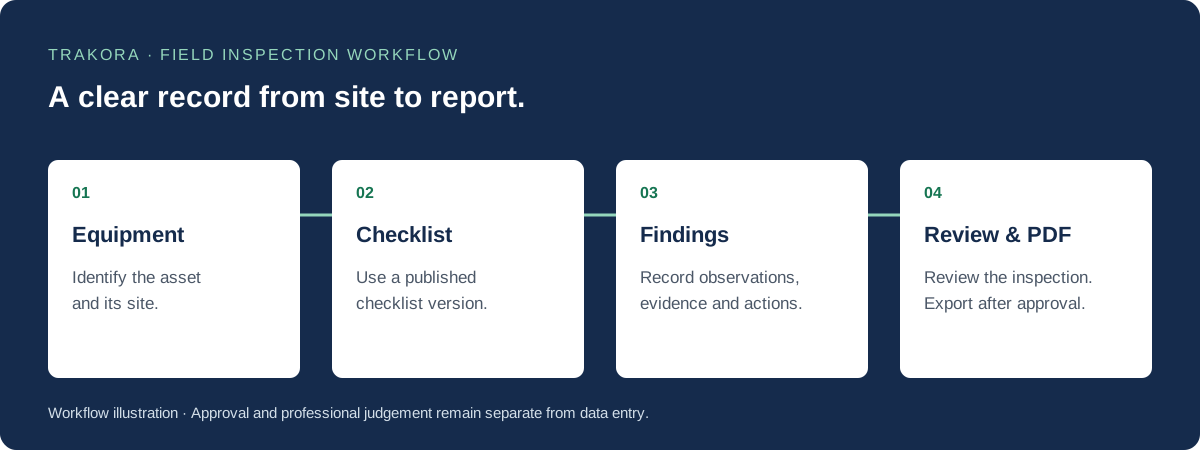
Inspection workflow: select equipment, complete a published checklist, record findings, then review and export an approved PDF report.
From equipment selection to an approved inspection report. Diagram of the Trakora workflow.

Step 01

Prepare a checklist around the work

A useful equipment inspection checklist follows the inspection in a practical order. Group related questions into sections, define the expected answer and make evidence or explanatory notes required where the inspection process needs them. Use language that an inspector can apply at the equipment.

  • Organise checks into clear sections.
  • Define answer types and relevant evidence requirements.
  • Use team standards to guide the questions.

Step 02

Publish changes without rewriting past inspections

Drafting and publishing have different roles. Edit a draft to refine the questions, then publish the version your inspectors should use. Each inspection pins its checklist version. That keeps past answers understandable when a newer version changes the wording, evidence requirements or order of questions.

  • Review the draft before publication.
  • Keep published versions identifiable.
  • Preserve the questions used for an existing inspection.

Step 03

Keep checklist answers and findings in context

Completing a checklist is only part of the record. Inspectors can add explanatory notes and evidence, then document findings that need review or follow-up. Reviewers can assess the completed inspection with its equipment context instead of piecing together separate notes and attachments.

  • Record answers against the selected equipment.
  • Explain observations with notes and evidence.
  • Bring the completed inspection into the report review process.

Questions and answers

Inspection software FAQs

What is a digital equipment inspection checklist?

It is a structured set of inspection questions completed electronically against an equipment record. Trakora keeps answers, notes, evidence requirements and the published checklist version together.

What happens when a published checklist changes?

Publish a new version for future work. Existing inspections retain the version they started with so their questions and answers remain traceable.

Does a completed checklist automatically approve an inspection?

No. Checklist completion and report approval are separate steps. Findings and the completed inspection still need the appropriate review before an approved report is available.

Explore the workflow

Field inspection, digital checklists and inspection reports

Field inspection software

Manage equipment inspections with published checklists, field observations, evidence, findings and reviewed PDF reports in Trakora. Request a demo.

Inspection reporting software

Turn field observations into structured findings, review completed inspections and export approved PDF reports with equipment context and inspection history.